


Tollsmart Toll Calculator - No
2.7148.00 Reviews
App Specs
- Version
- 3.0
- Updated On
- License
- Free
- Downloads
- 50,000+
- Developer
- Tollsmart, LLC
- Categories
- Travel & Local
- Platform
- Android
Screenshots
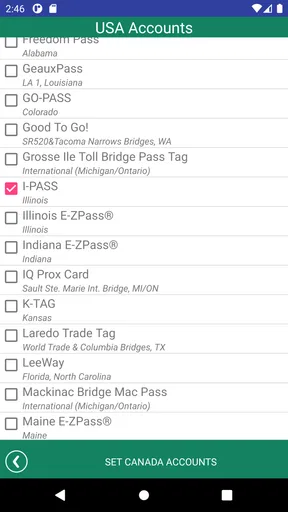
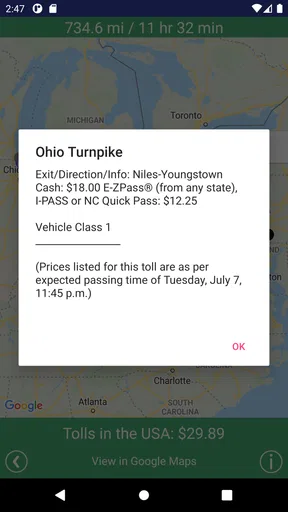
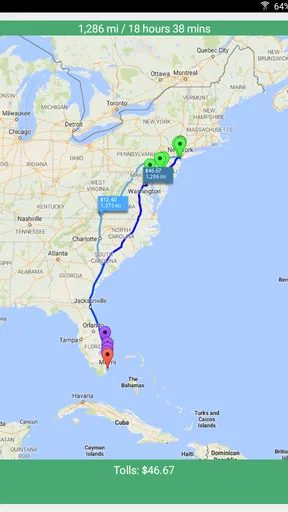
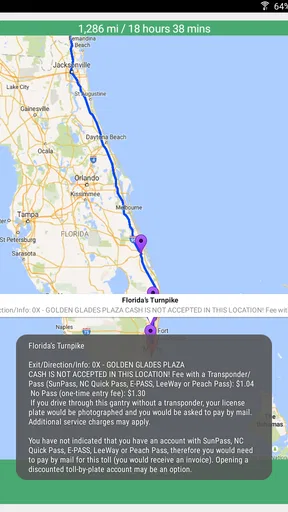
 Analysis by AppCompare
I find a toll calculator most useful before a trip, when I still have time to compare options rather than make a decision at a junction. That is where Tollsmart Toll Calculator earns its place: it focuses on the charges that ordinary navigation can leave in the background. I would use it to get a clearer picture of a route’s toll costs, then decide whether the faster or more direct choice is worth the extra spend.
When a connection matters to the plan
Because this is a travel-planning app, I would do the research somewhere with a reliable connection, before setting off. Entering a start and destination and reviewing the resulting routes is a planning task, not something I would want to squeeze into a stressful moment at the roadside. I would also check the result again if I changed the journey substantially, rather than assuming an earlier calculation still describes the new route.
The practical point is simple: treat the app as a tool for preparing a decision, not as a reason to handle your phone while driving. If a route choice needs attention, pull over safely or make it before leaving. A toll estimate can help you budget, but it should not distract you from signs, traffic, or the route you are actually following.
Useful in different kinds of trips
For a regular commute, I would compare the toll route with an alternative once, then use that information to decide whether the time saved is worth the recurring expense. A family road trip calls for a different calculation: the driver might prefer a predictable route, while passengers may be happy to take a slower option if it cuts costs. Seeing toll charges broken down by route can make that trade-off easier to discuss before everyone is already in the car.
The vehicle setting is especially worth checking before a trip in an RV or with a trailer. A standard-car estimate may not reflect what that combination will be charged, so entering the right vehicle details is more useful than simply comparing two route totals. I would confirm those details before relying on the result, particularly if the vehicle configuration changes between trips.
That is also a sensible workflow for work travel. I would use a route estimate to anticipate expenses, then keep whatever records my employer requires separately. A calculated route can help with planning, but it is not automatically a receipt or proof of the amount ultimately paid.
What to compare it with
Ordinary navigation apps are the natural alternative when the main question is how to get somewhere. Their strength is guiding a live journey; Tollsmart’s particular appeal is putting toll costs at the center of route planning. I would use navigation for turn-by-turn directions and traffic decisions, and use this app when I want to weigh toll expense against a different route. They solve related but not identical problems.
Worth Reading Before You Choose

Flipboard Shows What News Apps Must Do Beyond the Feed

Switching to Android Auto Means Rethinking Your Driving Routine

Google Calendar Makes a Crowded Week Easier to Manage

Ludo King Makes the Most of the Minutes Between Plans

Baby Panda World Brings Quick Play to Modern Phones, but Its Game Library Feels Busy

ESPN’s Live Game View Makes Following Close Games Easier
That division of labor is helpful, though it means the calculator is not a complete replacement for a navigation app. A route estimate cannot make the final driving decision for you, and real-world conditions may change the route you take. I would compare the proposed alternatives before departure, then follow current road signs and safe navigation guidance on the trip.
Small checks that can prevent surprises
When comparing routes, look beyond the single total. A route with lower toll charges may take longer or be less convenient, while a more expensive one could suit a tight schedule. I would decide what matters most for that specific trip—cash, time, simplicity, or the vehicle I am driving—before choosing. This keeps a low toll figure from looking automatically like the best answer.
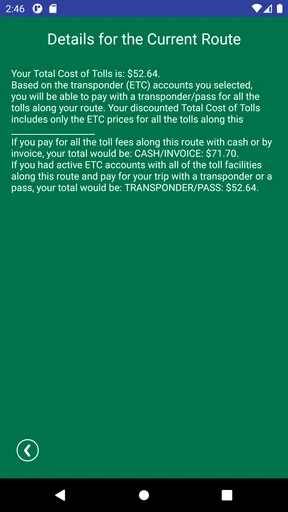
For a journey with several toll points, the breakdown is more useful than a bare estimate because it lets you see where the costs accumulate. I would use that detail to spot whether one bridge, tunnel, or stretch of road is driving most of the expense. If so, I could consider whether changing just that part of the journey is worthwhile, instead of rejecting the entire route.
Who will get the most from it
I think Tollsmart is most relevant to people who regularly travel through tolled areas, plan long drives, or need to account for a vehicle that may be charged differently from a standard car. It is less compelling if nearly all your trips are local and toll-free, or if you only want live directions and never compare route costs. In those cases, opening a separate calculator may add an unnecessary step.
It is also not a substitute for checking the details that matter to your own trip. Before leaving, I would make sure the starting point, destination, and vehicle information are right, and review the route rather than treating a number as a guarantee. That habit is particularly valuable when the itinerary changes or when cost estimates will be used for work planning.
For context, this free travel and local app comes from Tollsmart, LLC. It has a 2.7 average from 238 ratings, with 50K+ installs, so I would not assume every user has the same experience. The app is rated for Everyone, and its current version is 3.0; in-app purchases are listed at $2.99 per item. It was released on Jun 29, 2015, and requires iOS 8.1 or later. I would check the relevant app store for device compatibility before installing, especially on an older phone.
Planning around connection and uncertainty
I treat a toll estimate as a planning aid, not something to depend on at the last minute: I compare routes while I have a reliable connection, then keep a sensible alternative in mind if conditions change. This section looks at how I would handle an unexpected result or a weak signal without making a rushed choice, before turning to ways to keep searches purposeful.
If something does not go as expected
If a search does not return what I expect, I would first check for a simple input problem: a mistyped destination, an outdated starting point, or vehicle details that no longer match the trip. I would then retry when the connection is stable. That is a practical troubleshooting sequence, not a promise that every issue can be fixed that way; if the result still seems wrong, I would avoid making a costly decision from it and compare against another reliable source.
I would also keep a fallback in mind for travel through areas where connectivity is uncertain. Plan the toll comparison before entering a low-signal stretch, and avoid depending on a last-minute search to settle a route choice. I would not assume the app can provide the same information without a connection, so preparing ahead is the safer approach.
Keeping data use deliberate
For a single journey, I would enter the route when I need it and review the answer, rather than repeatedly refreshing the same search without a reason. The more useful data-conscious habit is to avoid unnecessary searches while moving and do the comparison before departure. If I am changing plans, I would make a fresh calculation when safe and connected, instead of trying to interact with the phone in traffic.
Travel estimates are most valuable when treated as estimates. Toll charges and the route actually taken can differ from an early plan, so I would leave room in a budget rather than relying on the displayed figure as an exact final expense. That caution matters for personal trips and even more when preparing a work expense forecast.
Where I would draw the line
I would choose a conventional navigation app first if my priority were live driving guidance, or another planning source if I needed details beyond toll costs. Tollsmart makes the most sense as a focused companion for comparing the toll side of a trip, especially when a bridge, tunnel, or toll road could materially affect the budget. It is not essential for every driver, but it can make a recurring cost easier to see before committing to a route.
What is Tollsmart Toll Calculator?
So, here’s the scoop. Tollsmart Toll Calculator is this nifty app available on both Android and iOS that calculates toll costs for your journey. It’s designed to help you budget for road trips or even just your regular routes that include toll roads, bridges, and tunnels. The app covers the US and Canada, and it's surprisingly comprehensive.
How Does It Work?
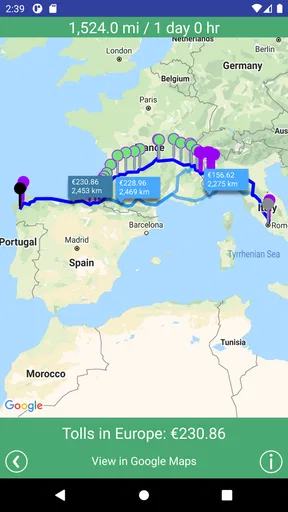
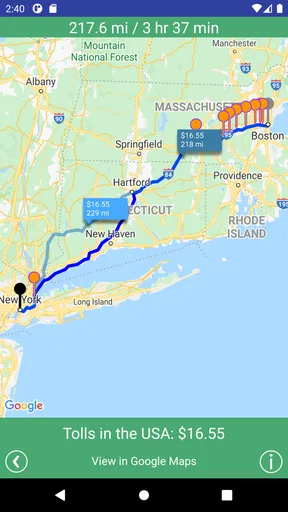
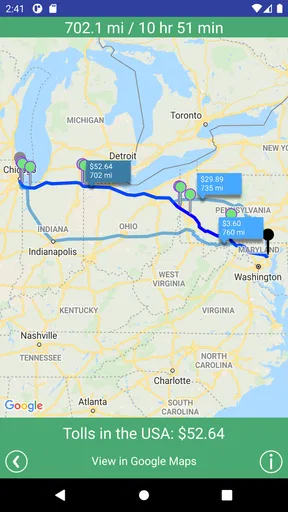
Using the app is a breeze. You just enter your starting point and destination, and voilà! The app calculates the toll costs for various routes. It even gives you a breakdown of each charge along the way. What I really liked is that it doesn’t just tell you the cost; it gives you alternatives, so you can avoid tolls if you’re feeling thrifty.
Another neat feature is the ability to account for your vehicle type. Got an RV or pulling a trailer? Tollsmart’s got you covered. It adjusts the toll calculations based on your vehicle’s size and weight, which is a game-changer for us road warriors!
User Experience
The interface is pretty clean and intuitive. You don’t need to be a tech wizard to navigate through it. The map view is clear, and the toll costs are displayed prominently, which is great because who wants to squint at their phone screen while driving?
One thing that stood out to me was how smoothly the app runs. No lagging or freezing, which is crucial when you’re relying on it to plan your route. It integrates well with GPS apps, making it even more convenient.
Why Use Tollsmart?
In a world where every penny counts, knowing how much you’ll spend on tolls before you hit the road is a huge plus. Whether you’re planning a cross-country adventure or just want to avoid nasty surprises on your daily drive, this app is a solid tool.
It’s particularly useful for business travelers who need to submit expenses. Imagine having a detailed report of all your tolls right at your fingertips. Pretty handy, right?
Final Thoughts
All in all, I found the Tollsmart Toll Calculator to be a valuable addition to my app collection. It takes the guesswork out of travel expenses and helps you make informed decisions about your route.
If you’re someone who frequently hits the road, this app is worth checking out. You’ll save time and probably a few bucks too. After all, who doesn’t love a little extra cash for those road trip snacks?
Pros
- Accurate toll calculations across the U.S.
- Supports multiple vehicle types and sizes.
- Includes fuel cost estimates for trips.
- Real-time traffic updates enhance planning.
- User-friendly interface and easy navigation.
Cons
- Limited coverage outside North America.
- Requires internet for real-time updates.
- Subscription needed for premium features.
- Occasional inaccuracies in traffic data.
- No integration with map navigation apps.
FAQs for Tollsmart Toll Calculator - No
What is Tollsmart Toll Calculator?
Tollsmart Toll Calculator is an app designed to help users estimate toll costs for their trips. It calculates toll fees across various routes and provides insights into potential expenses, making it easier for travelers to budget for their journeys. Available on Android and iOS, it’s a must-have for frequent road travelers.
How accurate are the toll estimates provided by Tollsmart?
Tollsmart uses up-to-date data from toll authorities to provide accurate estimates. However, it's important to note that actual tolls may vary due to real-time changes or additional fees such as surcharges or discounts. Users should always double-check against local toll information for the most precise costs.
Does Tollsmart support international toll roads?
Yes, Tollsmart covers a range of international toll roads in addition to those in the United States. The app continuously updates its database to include more countries, making it a versatile tool for international travelers. Users can check the app's country list to ensure their destination is supported.
Is there a cost to use Tollsmart Toll Calculator?
Tollsmart offers a free version that provides basic toll estimates. However, for more advanced features like specific route planning, users may need to purchase a subscription. The premium version provides additional functionality such as detailed cost breakdowns and alternative route options.
Can Tollsmart integrate with navigation apps?
Yes, Tollsmart can be integrated with popular navigation apps like Google Maps and Apple Maps. This allows users to seamlessly incorporate toll cost information into their route planning, providing a comprehensive travel solution. Integration ensures that users receive real-time updates and accurate directions.


